

SLV Installation - TiDB
SLV Installation - TiDB
Warum TiDB (MySQL Cluster)?
TiDB liefert eine horizontal skalierbare, Cloud-native HTAP-Datenbank, die das MySQL-Protokoll spricht. Viele verwaltete Datenbank-Dienste messen jeden gelesenen und schreiben, die schnell kostenprohibitiv für latenzkritische Solana-Workloads wird. mit
slv install, Sie können Ihren eigenen verteilten TiDB-Cluster, Bypass-Anbieter-Rate Grenzen, und halten Durchsatz hoch ohne wegweisende Abrechnung Überraschungen.Highlights
- TiDB: https://www.pingcap.com/tidb/
- MySQL-kompatibles Wire Protocol plus automatisches Sharding, so dass Sie vertraute Kunden während der Scale-out-Performance erhalten.
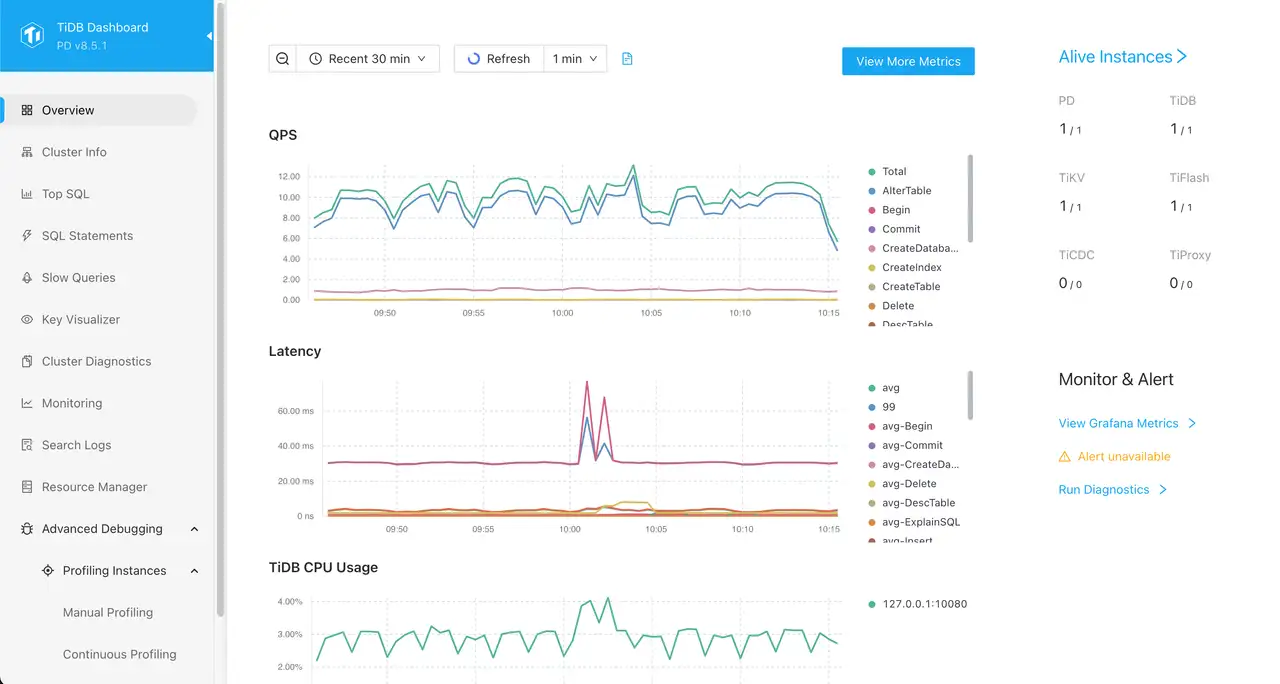
- Eingebautes TiUP-Management und TiDB Dashboard geben Ihnen Sicht in Cluster-Gesundheit aus der Box.
Führen Sie den Installer aus
Wählen Sie TiDB aus der Komponentenliste, nachdem Sie die Hosts anvisiert haben, die den Cluster ausführen sollten.
bash
$ slv install -i 1.1.1.1,
🚀 Installing software components...
? Select Software Component to Install (Redis)
  Redis
❯ TiDB (MySQL Cluster)
  Grafana
  Prometheus
  Node Exporter
  Kafka Cluster
$ slv install -i 1.1.1.1,
🚀 Installing software components...
? Select Software Component to Install (Redis)
Redis
❯ TiDB (MySQL Cluster)
Grafana
Prometheus
Node Exporter
Kafka ClusterHinweis: Ersatz1.1.1.1mit der IP-Adresse Ihres eigenen Servers.
Überprüfen Sie die Details
Bevor Ansible beginnt,
slv zeigt den Spielbuchpfad und das Inventar, damit Sie das Cluster-Ziel doppelt überprüfen können. Der CLI erinnert Sie auch daran, dass TiDB mehrere Minuten dauern kann, um je nach Hardware bereitzustellen.bash
🚀 Installing software components...
? Select Software Component to Install (Redis) › TiDB (MySQL Cluster)
✅ You selected: TiDB (MySQL Cluster)

📋 Installation Details:
Software: TiDB (MySQL Cluster)
Inventory: 1.1.1.1,
Playbook: /Users/fumi/.slv/template/0.9.800/ansible/cmn/software/install-tidb.yml
⚠️ a few minutes to 10 minutes may be required for TiDB installation depending on your server performance.
? Do you want to proceed with the installation? (y/N) ›
🚀 Installing software components...
? Select Software Component to Install (Redis) › TiDB (MySQL Cluster)
✅ You selected: TiDB (MySQL Cluster)
📋 Installation Details:
Software: TiDB (MySQL Cluster)
Inventory: 1.1.1.1,
Playbook: /Users/fumi/.slv/template/0.9.800/ansible/cmn/software/install-tidb.yml
⚠️ a few minutes to 10 minutes may be required for TiDB installation depending on your server performance.
? Do you want to proceed with the installation? (y/N) › Beachten Sie die ansible Execution
Nach Bestätigung,
slv Handsteuerung an Ansible, die die TiDB-Komponenten und Unterstützungsdienste auf jedem Host ausbaut.bash
🚀 Running ansible: ansible-playbook -i 1.1.1.1, -u solv /Users/fumi/.slv/template/0.9.800/ansible/cmn/software/install-tidb.yml

PLAY [Install and configure TiDB cluster] ************************************************************

TASK [Gathering Facts] *******************************************************************************
🚀 Running ansible: ansible-playbook -i 1.1.1.1, -u solv /Users/fumi/.slv/template/0.9.800/ansible/cmn/software/install-tidb.yml
PLAY [Install and configure TiDB cluster] ************************************************************
TASK [Gathering Facts] *******************************************************************************Die Endpunkte überprüfen
Wenn die Bereitstellung beendet, die CLI druckt Verbindungsdaten, so können Sie TiDB in Ihre Apps sofort drahten und bestätigen, dass das Dashboard erreichbar ist.
bash
✅ Installation completed successfully!

🌐 Access Information:

TiDB Endpoint: 1.1.1.1:4000 (MySQL Protocol)
Dashboard http://1.1.1.1:7301/dashboard/#/signin (HTTP Protocol)

🔑 Default credentials
Username: root
Password: <empty>
✅ Installation completed successfully!
🌐 Access Information:
TiDB Endpoint: 1.1.1.1:4000 (MySQL Protocol)
Dashboard http://1.1.1.1:7301/dashboard/#/signin (HTTP Protocol)
🔑 Default credentials
Username: root
Password: <empty>Das ist alles
Anmelden TiDB Dashboard at
http://1.1.1.1:7301/dashboard/#/signin die oben genannten Standard-Berechtigungen verwenden. Von dort aus können Sie die Clusterlast überwachen, SQL-Anweisungen inspizieren und die Komponentengesundheit überprüfen.