

SLV स्थापित करें - TiDB
SLV स्थापित करें - TiDB
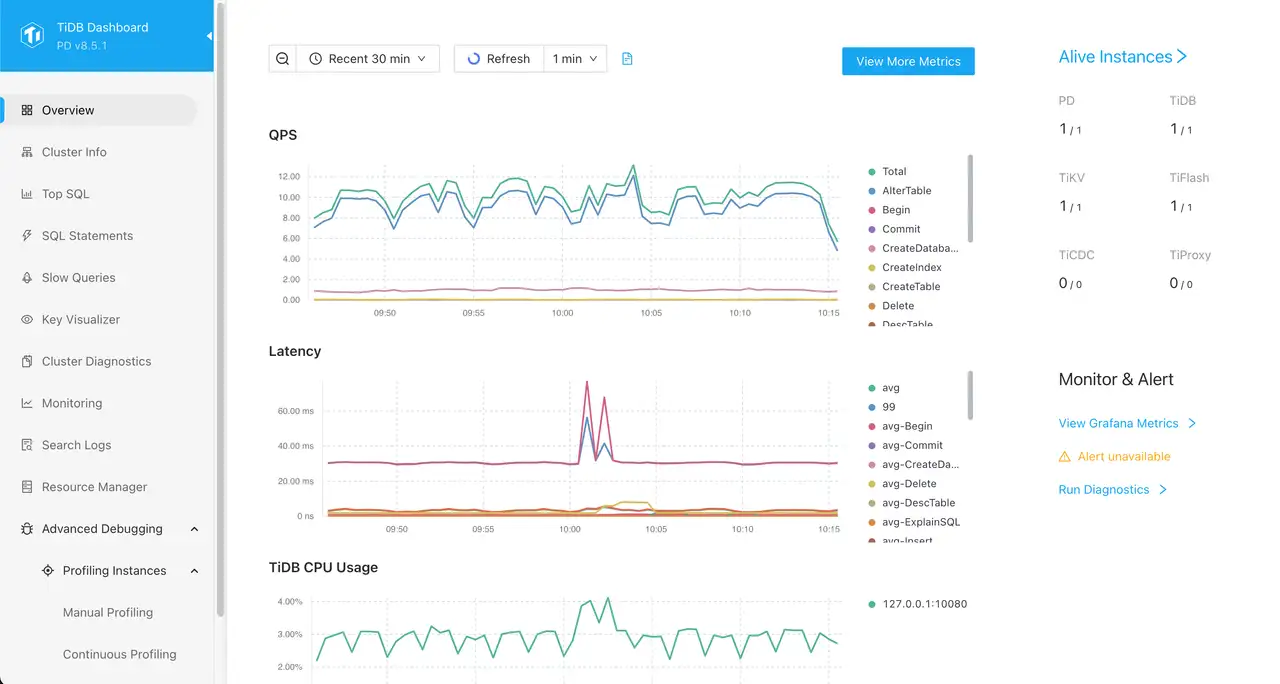
क्यों TiDB (MySQL क्लस्टर)?
TiDB एक क्षैतिज स्केलेबल, क्लाउड-नेटिव HTAP डेटाबेस प्रदान करता है जो MySQL प्रोटोकॉल को बोलता है। कई प्रबंधित डेटाबेस सेवा मीटर हर पढ़ने और लिखने के लिए, जो जल्दी से विलंबता-महत्वपूर्ण के लिए लागत-प्रतिषेध हो जाता है Solana कार्यभार
slv installआप अपने खुद के वितरित खड़े हो सकते हैं TiDB क्लस्टर, बायपास प्रदाता दर सीमा, और बिना किसी रनवे बिलिंग आश्चर्य के माध्यम से उच्च रखने के लिए।** हाइलाइट्स**
- TiDB: https://www.pingcap.com/tidb/
- MySQL-compatible wire प्रोटोकॉल प्लस स्वचालित sharding, इसलिए आप स्केल-आउट प्रदर्शन प्राप्त करते समय परिचित ग्राहकों को रखते हैं।
- अंतर्निहित TiUP प्रबंधन और TiDB डैशबोर्ड आपको बॉक्स से बाहर क्लस्टर स्वास्थ्य में दृश्यता प्रदान करता है।
इंस्टॉलर चलाएं
चयन TiDB उस मेजबान को लक्षित करने के बाद घटक सूची से जिसे क्लस्टर चलाने चाहिए।
bash
$ slv install -i 1.1.1.1,
🚀 Installing software components...
? Select Software Component to Install (Redis)
  Redis
❯ TiDB (MySQL Cluster)
  Grafana
  Prometheus
  Node Exporter
  Kafka Cluster
$ slv install -i 1.1.1.1,
🚀 Installing software components...
? Select Software Component to Install (Redis)
Redis
❯ TiDB (MySQL Cluster)
Grafana
Prometheus
Node Exporter
Kafka Clusterध्यान दें: बदलें1.1.1.1साथ IP अपने सर्वर का पता
विवरण की समीक्षा करें
पहले से ही,
slv यह पृष्ठ स्वचालित रूप से अनुवादित किया गया था, जिसमें से आपको सबसे अच्छा विकल्प मिल सकता है। TiDB हार्डवेयर के आधार पर प्रावधान करने के लिए कई मिनट लग सकते हैं।bash
🚀 Installing software components...
? Select Software Component to Install (Redis) › TiDB (MySQL Cluster)
✅ You selected: TiDB (MySQL Cluster)

📋 Installation Details:
Software: TiDB (MySQL Cluster)
Inventory: 1.1.1.1,
Playbook: /Users/fumi/.slv/template/0.9.800/ansible/cmn/software/install-tidb.yml
⚠️ a few minutes to 10 minutes may be required for TiDB installation depending on your server performance.
? Do you want to proceed with the installation? (y/N) ›
🚀 Installing software components...
? Select Software Component to Install (Redis) › TiDB (MySQL Cluster)
✅ You selected: TiDB (MySQL Cluster)
📋 Installation Details:
Software: TiDB (MySQL Cluster)
Inventory: 1.1.1.1,
Playbook: /Users/fumi/.slv/template/0.9.800/ansible/cmn/software/install-tidb.yml
⚠️ a few minutes to 10 minutes may be required for TiDB installation depending on your server performance.
? Do you want to proceed with the installation? (y/N) ›Ansible Execution
पुष्टिकरण के बाद
slv हाथ नियंत्रण करने के लिए Ansible, जो बाहर बनाता है TiDB प्रत्येक होस्ट पर घटकों और सहायक सेवाओं।bash
🚀 Running ansible: ansible-playbook -i 1.1.1.1, -u solv /Users/fumi/.slv/template/0.9.800/ansible/cmn/software/install-tidb.yml

PLAY [Install and configure TiDB cluster] ************************************************************

TASK [Gathering Facts] *******************************************************************************
🚀 Running ansible: ansible-playbook -i 1.1.1.1, -u solv /Users/fumi/.slv/template/0.9.800/ansible/cmn/software/install-tidb.yml
PLAY [Install and configure TiDB cluster] ************************************************************
TASK [Gathering Facts] *******************************************************************************अंतिम बिंदुओं को सत्यापित करें
जब प्रावधान खत्म हो जाता है, तो CLI कनेक्शन विवरण को प्रिंट करता है ताकि आप तार कर सकें TiDB तुरंत अपने ऐप्स में और डैशबोर्ड की पुष्टि करने के लिए पहुंच योग्य है।
bash
✅ Installation completed successfully!

🌐 Access Information:

TiDB Endpoint: 1.1.1.1:4000 (MySQL Protocol)
Dashboard http://1.1.1.1:7301/dashboard/#/signin (HTTP Protocol)

🔑 Default credentials
Username: root
Password: <empty>
✅ Installation completed successfully!
🌐 Access Information:
TiDB Endpoint: 1.1.1.1:4000 (MySQL Protocol)
Dashboard http://1.1.1.1:7301/dashboard/#/signin (HTTP Protocol)
🔑 Default credentials
Username: root
Password: <empty>डैशबोर्ड
लॉग इन करें TiDB डैशबोर्ड पर
http://1.1.1.1:7301/dashboard/#/signin ऊपर डिफ़ॉल्ट क्रेडेंशियल का उपयोग करके। वहां से आप क्लस्टर लोड की निगरानी कर सकते हैं, SQL स्टेटमेंट का निरीक्षण कर सकते हैं और घटक स्वास्थ्य को सत्यापित कर सकते हैं।