

SLV ติดตั้ง - ตัวส่งออกไปยังบริการ Node
SLV ติดตั้ง - ตัวส่งออกไปยังบริการ Node
ทําไม จึง เป็น ผู้ ส่ง ออก ของ นอต ต์?
ผู้ส่งออก Node เปิดโปงฮาร์ดแวร์และเครื่องเขียน OSS --CPU, ความทรงจํา, ดิสก์, เครือข่าย -- ดังนั้น Prometheus ถึง Grafana สามารถแจ้งเตือนปัญหาพื้นฐานได้ ก่อนที่มันจะกระทบ Solana โหลดแล้ว ติดตั้งผ่าน
slv install ทําให้แน่ใจว่าทุกเซิร์ฟเวอร์รายงาน การวัดระบบแบบสม่ําเสมอ โดยไม่ต้องตั้งค่าด้วยตนเอง- ตัวส่งออก Node: https://github.com/prometheus/node_exporter
- แฝดน้ําหนักเบาที่ขึ้นหน้ากล้องน้อย สมบูรณ์แบบสําหรับหุ่นเปลือยหรือรองประธาน
- ให้เมตริกฐานและแจ้งเตือนขึ้นอยู่กับการข้าม Prometheus/Grafana.
ประมวลผลตัวติดตั้ง
จุด
slv install ที่โฮสต์ที่คุณต้องการจะติดตามและเลือกผู้ส่งออก Node จากรายการbash
$ slv install -i 1.1.1.1,
🚀 Installing software components...
? Select Software Component to Install (Redis)
  Redis
  TiDB (MySQL Cluster)
  Grafana
  Prometheus
❯ Node Exporter
  Kafka Cluster
$ slv install -i 1.1.1.1,
🚀 Installing software components...
? Select Software Component to Install (Redis)
Redis
TiDB (MySQL Cluster)
Grafana
Prometheus
❯ Node Exporter
Kafka Clusterหมายเหตุ: แทนที่1.1.1.1กับ IP ที่อยู่เซิร์ฟเวอร์ของคุณเอง
ทบทวน ราย ละเอียด
ใช้หน้าจอรายละเอียดเพื่อยืนยันรายการสินค้าที่ถูกต้อง และสมุดเล่นก่อนที่แอนเซเบิลจะเริ่ม
bash
🚀 Installing software components...
? Select Software Component to Install (Redis) › Node Exporter
✅ You selected: Node Exporter

📋 Installation Details:
Software: Node Exporter
Inventory: 1.1.1.1,
Playbook: /Users/fumi/.slv/template/0.9.800/ansible/cmn/software/install-node-exporter.yml
? Do you want to proceed with the installation? (y/N) ›
🚀 Installing software components...
? Select Software Component to Install (Redis) › Node Exporter
✅ You selected: Node Exporter
📋 Installation Details:
Software: Node Exporter
Inventory: 1.1.1.1,
Playbook: /Users/fumi/.slv/template/0.9.800/ansible/cmn/software/install-node-exporter.yml
? Do you want to proceed with the installation? (y/N) ›สังเกต การ ประหาร ชีวิต ที่ ไม่ อาจ หลีก เลี่ยง ได้
slv เรียกเล่นคู่มือของผู้ส่งออก Node และเปิดใช้งานเป็นบริการของระบบ เพื่อให้มันเริ่มการทํางานอัตโนมัติเมื่อบูตbash
🚀 Running ansible: ansible-playbook -i 1.1.1.1, -u solv /Users/fumi/.slv/template/0.9.800/ansible/cmn/software/install-node-exporter.yml

PLAY [Install and configure Node Exporter] ***********************************************************

TASK [Gathering Facts] *******************************************************************************
🚀 Running ansible: ansible-playbook -i 1.1.1.1, -u solv /Users/fumi/.slv/template/0.9.800/ansible/cmn/software/install-node-exporter.yml
PLAY [Install and configure Node Exporter] ***********************************************************
TASK [Gathering Facts] *******************************************************************************ตรวจ สอบ จุด จบ
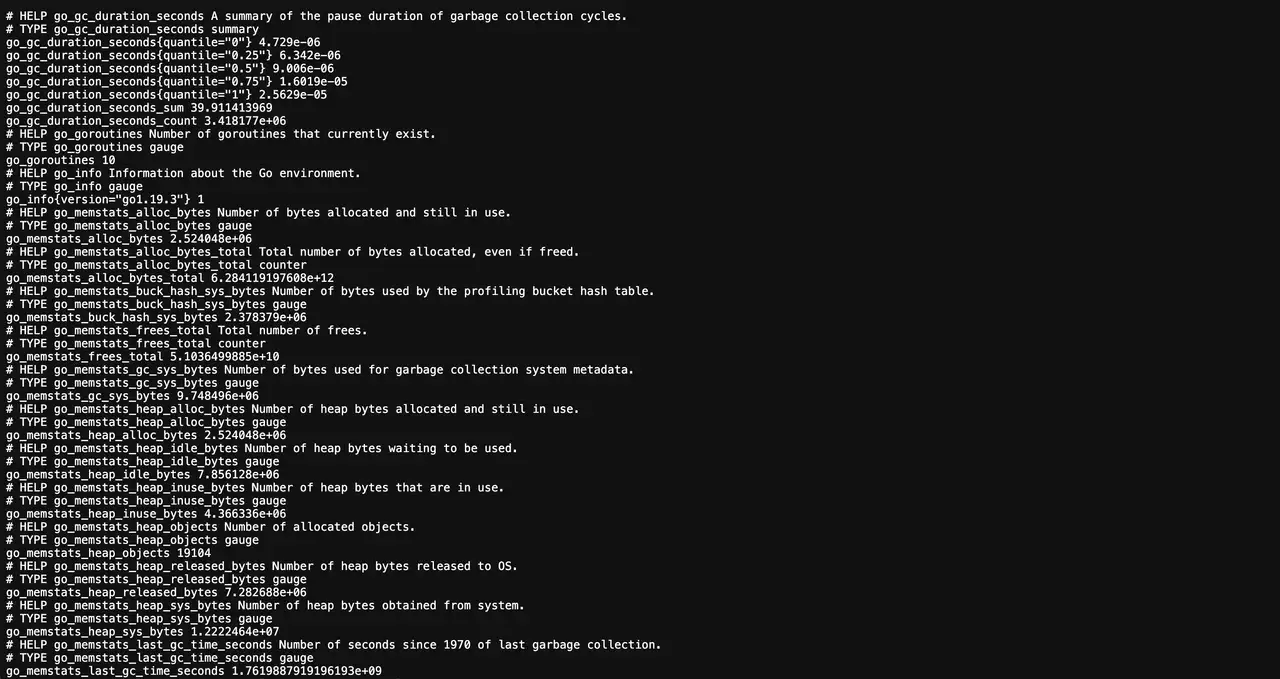
หลังจากติดตั้ง Node Explorer ตีพิมพ์ metrics on พอร์ต 9100. Prometheus ควรขูดปลายจุดนี้เพื่อป้อนอาหารและแจ้งเตือน
bash
✅ Installation completed successfully!

🌐 Access Information:

Node Exporter URL: http://1.1.1.1:9100/metrics
✅ Installation completed successfully!
🌐 Access Information:
Node Exporter URL: http://1.1.1.1:9100/metricsแดชบอร์ด
แวะชม
http://1.1.1.1:9100/metrics เพื่อยืนยันการแสดงผลดิบ จากนั้นเพิ่มเป้าหมายใน Prometheus และเสียบปลั๊กที่นิยามไว้แล้ว Grafana หน้าปัด (เช่น น็อด เอพ รา เม อร์ เต็ม) เพื่อสร้างภาพสุขภาพของโฮสต์