

SLV 설치 - TiDB
SLV 설치 - TiDB
왜 TiDB (MySQL Cluster)인가?
TiDB는 MySQL 프로토콜을 사용하는 수평 확장 가능한 클라우드 네이티브 HTAP 데이터베이스입니다. 많은 관리형 데이터베이스 서비스는 모든 읽기와 쓰기를 과금하므로, 레이턴시가 중요한 Solana 워크로드에서는 금방 비용이 감당하기 어려워집니다.
slv install을 사용하면 자체 분산 TiDB 클러스터를 구축하고, 프로바이더의 레이트 리밋을 우회하며, 폭주하는 청구 걱정 없이 높은 스루풋을 유지할 수 있습니다.하이라이트
- TiDB: https://www.pingcap.com/tidb/
- MySQL 호환 와이어 프로토콜과 자동 샤딩으로, 익숙한 클라이언트를 그대로 사용하면서 스케일아웃 성능을 얻을 수 있습니다.
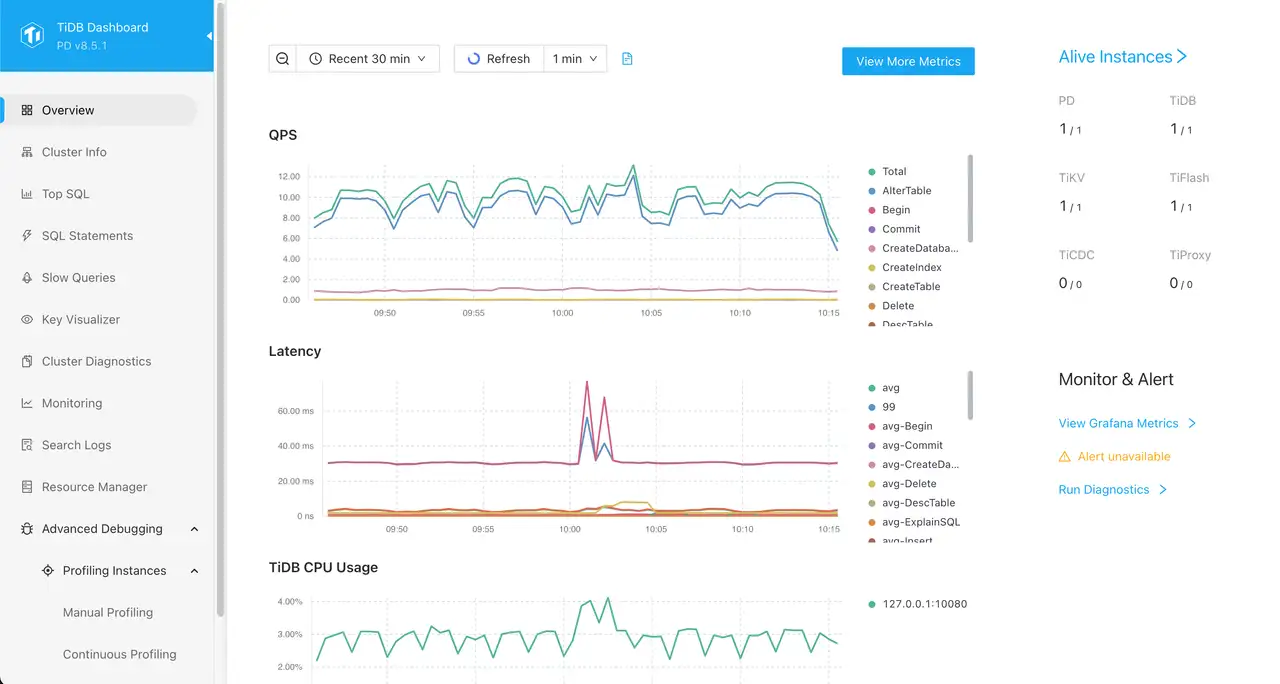
- 내장 TiUP 관리와 TiDB Dashboard로 클러스터 상태를 바로 가시화할 수 있습니다.
설치 프로그램 실행
클러스터를 실행할 호스트를 대상으로 지정한 후 컴포넌트 목록에서 TiDB를 선택하세요.
bash
$ slv install -i 1.1.1.1,
🚀 Installing software components...
? Select Software Component to Install (Redis)
  Redis
❯ TiDB (MySQL Cluster)
  Grafana
  Prometheus
  Node Exporter
  Kafka Cluster
$ slv install -i 1.1.1.1,
🚀 Installing software components...
? Select Software Component to Install (Redis)
Redis
❯ TiDB (MySQL Cluster)
Grafana
Prometheus
Node Exporter
Kafka Cluster참고:1.1.1.1을 자신의 서버 IP 주소로 바꾸세요.
세부 정보 확인
Ansible이 시작되기 전에
slv가 플레이북 경로와 인벤토리를 표시하므로 클러스터 대상을 다시 확인할 수 있습니다. CLI는 또한 하드웨어에 따라 TiDB 프로비저닝에 몇 분이 걸릴 수 있음을 알려줍니다.bash
🚀 Installing software components...
? Select Software Component to Install (Redis) › TiDB (MySQL Cluster)
✅ You selected: TiDB (MySQL Cluster)

📋 Installation Details:
Software: TiDB (MySQL Cluster)
Inventory: 1.1.1.1,
Playbook: /Users/fumi/.slv/template/0.9.800/ansible/cmn/software/install-tidb.yml
⚠️ a few minutes to 10 minutes may be required for TiDB installation depending on your server performance.
? Do you want to proceed with the installation? (y/N) ›
🚀 Installing software components...
? Select Software Component to Install (Redis) › TiDB (MySQL Cluster)
✅ You selected: TiDB (MySQL Cluster)
📋 Installation Details:
Software: TiDB (MySQL Cluster)
Inventory: 1.1.1.1,
Playbook: /Users/fumi/.slv/template/0.9.800/ansible/cmn/software/install-tidb.yml
⚠️ a few minutes to 10 minutes may be required for TiDB installation depending on your server performance.
? Do you want to proceed with the installation? (y/N) › Ansible 실행 관찰
확인 후
slv는 제어를 Ansible에 넘기고, Ansible이 각 호스트에 TiDB 컴포넌트와 지원 서비스를 구축합니다.bash
🚀 Running ansible: ansible-playbook -i 1.1.1.1, -u solv /Users/fumi/.slv/template/0.9.800/ansible/cmn/software/install-tidb.yml

PLAY [Install and configure TiDB cluster] ************************************************************

TASK [Gathering Facts] *******************************************************************************
🚀 Running ansible: ansible-playbook -i 1.1.1.1, -u solv /Users/fumi/.slv/template/0.9.800/ansible/cmn/software/install-tidb.yml
PLAY [Install and configure TiDB cluster] ************************************************************
TASK [Gathering Facts] *******************************************************************************엔드포인트 확인
프로비저닝이 완료되면 CLI가 접속 정보를 출력하므로 TiDB를 앱에 바로 연결하고 대시보드 접속을 확인할 수 있습니다.
bash
✅ Installation completed successfully!

🌐 Access Information:

TiDB Endpoint: 1.1.1.1:4000 (MySQL Protocol)
Dashboard http://1.1.1.1:7301/dashboard/#/signin (HTTP Protocol)

🔑 Default credentials
Username: root
Password: <empty>
✅ Installation completed successfully!
🌐 Access Information:
TiDB Endpoint: 1.1.1.1:4000 (MySQL Protocol)
Dashboard http://1.1.1.1:7301/dashboard/#/signin (HTTP Protocol)
🔑 Default credentials
Username: root
Password: <empty>대시보드
위의 기본 자격 증명으로
http://1.1.1.1:7301/dashboard/#/signin의 TiDB Dashboard에 로그인하세요. 여기에서 클러스터 부하를 모니터링하고, SQL 문을 검사하고, 컴포넌트 상태를 확인할 수 있습니다.