

SLV 安裝 - TiDB
SLV 安裝 - TiDB
為什麼選擇 TiDB(MySQL 叢集)?
TiDB 提供了一個水平可擴充套件的雲原生 HTAP 資料庫,支援 MySQL 協議。許多託管資料庫服務對每次讀寫收費,這對延遲敏感的 Solana 工作負載來說很快就會變得成本過高。透過
slv install,您可以搭建自己的分散式 TiDB 叢集,繞過供應商的速率限制,在避免意外高額賬單的同時保持高吞吐量。亮點
- TiDB:https://www.pingcap.com/tidb/
- 相容 MySQL 協議並支援自動分片,讓您在使用熟悉的客戶端的同時獲得橫向擴充套件效能。
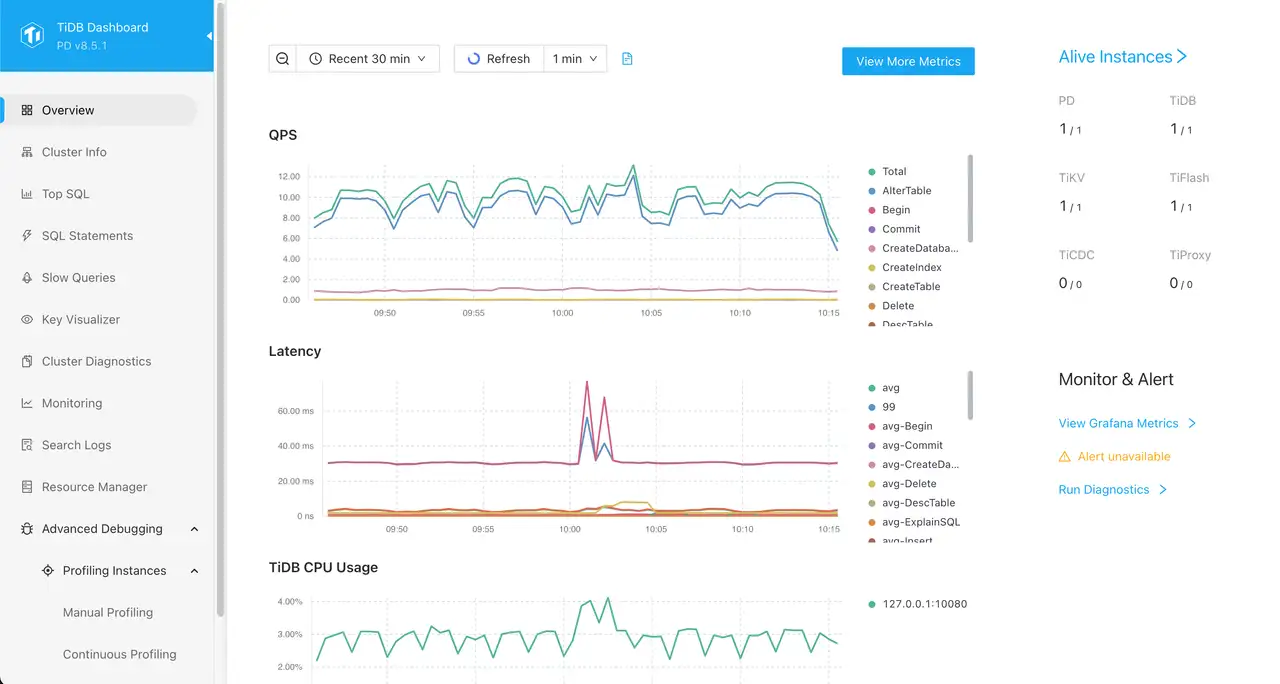
- 內建 TiUP 管理和 TiDB Dashboard,開箱即用地提供叢集健康狀態視覺化。
執行安裝程式
在指定執行叢集的目標主機後,從元件列表中選擇 TiDB。
bash
$ slv install -i 1.1.1.1,
🚀 Installing software components...
? Select Software Component to Install (Redis)
  Redis
❯ TiDB (MySQL Cluster)
  Grafana
  Prometheus
  Node Exporter
  Kafka Cluster
$ slv install -i 1.1.1.1,
🚀 Installing software components...
? Select Software Component to Install (Redis)
Redis
❯ TiDB (MySQL Cluster)
Grafana
Prometheus
Node Exporter
Kafka Cluster注意:請將1.1.1.1替換為您自己伺服器的 IP 地址。
檢視詳細資訊
在 Ansible 開始之前,
slv 會顯示 playbook 路徑和 inventory,以便您仔細檢查叢集目標。CLI 還會提醒您,TiDB 的配置可能需要幾分鐘時間,具體取決於硬體效能。bash
🚀 Installing software components...
? Select Software Component to Install (Redis) › TiDB (MySQL Cluster)
✅ You selected: TiDB (MySQL Cluster)

📋 Installation Details:
Software: TiDB (MySQL Cluster)
Inventory: 1.1.1.1,
Playbook: /Users/fumi/.slv/template/0.9.800/ansible/cmn/software/install-tidb.yml
⚠️ a few minutes to 10 minutes may be required for TiDB installation depending on your server performance.
? Do you want to proceed with the installation? (y/N) ›
🚀 Installing software components...
? Select Software Component to Install (Redis) › TiDB (MySQL Cluster)
✅ You selected: TiDB (MySQL Cluster)
📋 Installation Details:
Software: TiDB (MySQL Cluster)
Inventory: 1.1.1.1,
Playbook: /Users/fumi/.slv/template/0.9.800/ansible/cmn/software/install-tidb.yml
⚠️ a few minutes to 10 minutes may be required for TiDB installation depending on your server performance.
? Do you want to proceed with the installation? (y/N) ›觀察 Ansible 執行過程
確認後,
slv 將控制權交給 Ansible,Ansible 會在每個主機上構建 TiDB 元件和支援服務。bash
🚀 Running ansible: ansible-playbook -i 1.1.1.1, -u solv /Users/fumi/.slv/template/0.9.800/ansible/cmn/software/install-tidb.yml

PLAY [Install and configure TiDB cluster] ************************************************************

TASK [Gathering Facts] *******************************************************************************
🚀 Running ansible: ansible-playbook -i 1.1.1.1, -u solv /Users/fumi/.slv/template/0.9.800/ansible/cmn/software/install-tidb.yml
PLAY [Install and configure TiDB cluster] ************************************************************
TASK [Gathering Facts] *******************************************************************************驗證端點
配置完成後,CLI 會列印連線詳情,以便您可以立即將 TiDB 接入應用程式並確認儀表板可訪問。
bash
✅ Installation completed successfully!

🌐 Access Information:

TiDB Endpoint: 1.1.1.1:4000 (MySQL Protocol)
Dashboard http://1.1.1.1:7301/dashboard/#/signin (HTTP Protocol)

🔑 Default credentials
Username: root
Password: <empty>
✅ Installation completed successfully!
🌐 Access Information:
TiDB Endpoint: 1.1.1.1:4000 (MySQL Protocol)
Dashboard http://1.1.1.1:7301/dashboard/#/signin (HTTP Protocol)
🔑 Default credentials
Username: root
Password: <empty>儀表板
使用上述預設憑據登入 TiDB Dashboard(
http://1.1.1.1:7301/dashboard/#/signin)。在這裡您可以監控叢集負載、檢查 SQL 語句並驗證元件健康狀態。